MikroTik SFTP backup script
Automated backups for MikroTik devices can be accomplished by running a scheduled script. The following script can be run in the scheduler in order to automate the backups to an SFTP share. It was tested on a MiroTik hEX RB750Gr3 with RouterOS 7.20.1. Just make sure to adjust the first five variables to your needs. This script is based on another script I found on the forum – here. I adjusted the date settings in the filename since these weren’t working for me.
Script#
# Variables
:local sftpServer "<SFTP Server IP>"
:local sftpUser "<SFTP User>"
:local sftpPass "<SFTP User Password>"
# Set subdirectory on SFTP server
:local sftpDirectory "/data"
#Define what port the SFTP server is listening on
:local sftpPort 22

# Define binary backup and RSC export file names
:local backupFileName ("config_backup_" . [/system identity get name] . "_" . [:put [/system clock get date]]. "_" . [:put [/system clock get time]])
:local exportFileName ("config_export_" . [/system identity get name] . "_" . [:put [/system clock get date]] . "_" . [:put [/system clock get time]])

# Generate binary backup
/system backup save name=$backupFileName
# Generate export
/export file=$exportFileName
# Wait for backup files to be created
:delay 10s

# SFTP URL format
:local sftpUrl ("sftp://" . $sftpServer . ":" . $sftpPort . $sftpDirectory . "/")

# Upload binary backup to SFTP server
/tool fetch url=($sftpUrl . $backupFileName . ".backup") src-path=($backupFileName . ".backup") user=$sftpUser password=$sftpPass upload=yes
# Upload export to SFTP server
/tool fetch url=($sftpUrl . $exportFileName . ".rsc") src-path=($exportFileName . ".rsc") user=$sftpUser password=$sftpPass upload=yes

# Remove local binary backup file
/file remove ($backupFileName . ".backup")
# Remove local backup file
/file remove ($exportFileName . ".rsc")
Scheduler#
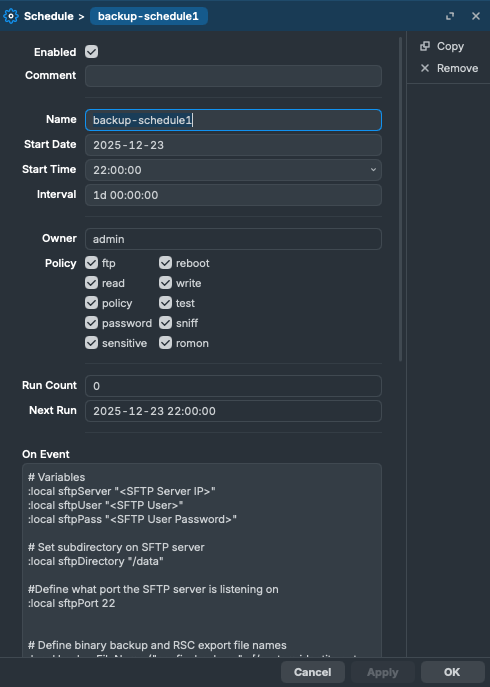
In order to run it on a schedule, you can create a new schedule under System > Scheduler.
Give it a name, start date and a start time when it should run first. The interval defines after which time the script should run again. For me its after 24 hours – so every day we get a new backup at 22:00. The On Event field should contain the content of the script with the adjusted variables.