Remove ConfigMgr client in task sequence during OSD deployment
I was busy the last few days creating a task sequence inside the Microsoft Configuration Manager (Config Mgr) or also known as SCCM in the past, where we remove the config mgr agent after the task sequence is finished. Sounds easy right? Well I thought so too, but it wasnt as easy as run ccmsetup.exe /uninstall as a command line argument.
What does not work#
- I tried to run
ccmsetup.exe /uninstallas a command line argument. In WinPE and full OS mode. - All other forms of running the
ccmsetup.exe /uninstallcommand inside powershell scripts. - I found this script which kind of worked but it left a lot of remnant files in C:\Windows. Additionally the task sequence breaks directly after execution.
What did work#
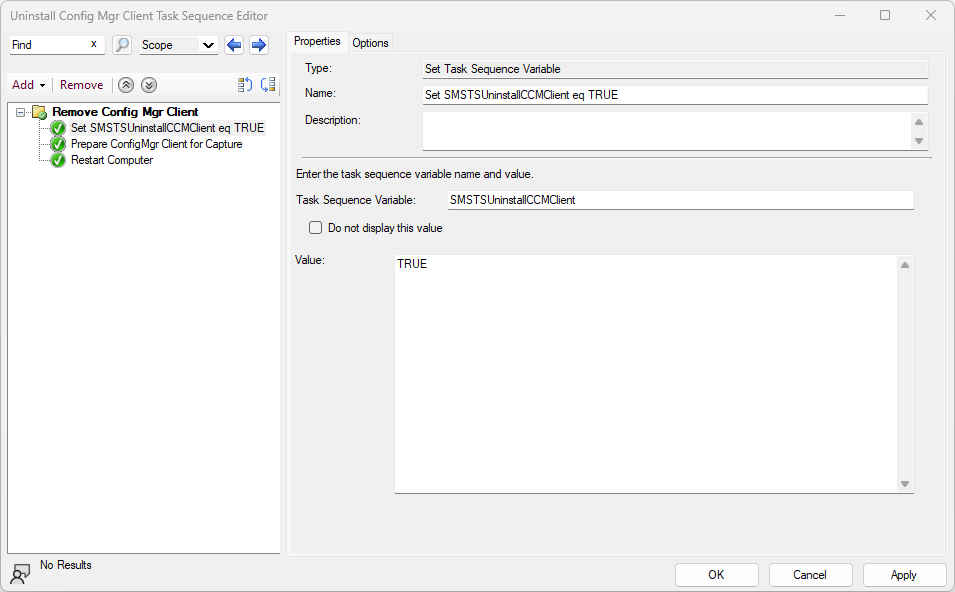
The cleanest way to remove the agent from the computer at the end of the task sequence is to use the build-in Prepare ConfigMgr Client for Capture method.
For once, Microsoft actually documented the behaviour really well, and it does exactly what I wanted. We only have to do one trick before running this task.
The task sequence variable SMSTSUninstallCCMClient needs to be set to TRUE before running Prepare ConfigMgr Client for Capture. If we dont do this, the actual client software will remain on the workstation but it will remove all the configurations, policies, maintenance tasks, registry keys and so on.
With this combination we have a clean and offical way to remove the agent at the end of an OSD deployment. The task sequence should have these following steps at the very end of the deployment: